






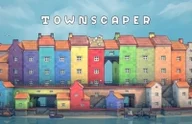
Townscaper is a relaxing building toy where you create island towns one block at a time.
Here's a quick look at the game:
What is Townscaper?
Townscaper is a browser town-building sandbox with no score, timer, combat, or win condition. You place colorful blocks on a grid over water, and the game turns them into houses, streets, arches, stairs, towers, bridges, and little coastal structures.
The main goal is creative building. You choose colors, click to add pieces, remove pieces when needed, and shape a small seaside town or a tall floating city by experimenting with placement.
How to Play Townscaper
Start with one block on the water, then add more around it. The game automatically reshapes buildings based on where you place blocks. A single piece may become a wall, roof, balcony, arch, or walkway depending on its neighbors.
There is no wrong objective to chase. You can build low villages, stacked towers, canal paths, small courtyards, or long streets. If a shape looks too heavy, remove blocks and rebuild the silhouette. If a color feels flat, switch colors to separate roofs, walls, and districts.
The best part of play is discovery. Try placing blocks in circles, lines, corners, and vertical stacks. Townscaper reacts to the pattern, so small changes can create surprising details without menus or complex tools.
Controls
| Key | Action |
|---|---|
| Left Mouse Button | Add block |
| Right Mouse Button | Remove block |
| Mouse Drag | Rotate view |
| Mouse Wheel | Zoom |
Tips for Townscaper
- Build small clusters first, then connect them with streets.
- Mix colors by district to make the town easier to read.
- Remove blocks to create arches, gaps, and waterfront edges.
- Stack carefully; tall towers look better with a wide base.