






Play Golf Mini online, aim each shot carefully, avoid tricky obstacles, and reach the hole with as few strokes as possible.
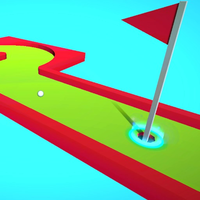
Here's a quick look at the game:
Golf Mini is a 3D browser mini-golf game built around precision, route planning, and controlled shots. Your goal is simple: guide the ball into the hole while using the minimum number of strokes, but each course introduces obstacles, traps, and angles that make careless shots costly.
What Is Golf Mini?
Golf Mini turns miniature golf into a series of compact physics-based puzzles. Instead of choosing clubs or managing traditional golf statistics, you directly control the direction and strength of each shot with your mouse or touchscreen.
Every level gives you a new course to solve. You need to locate the hole, study the obstacles between your ball and the target, choose an angle, and decide how much power to use. A strong shot can cover distance quickly, but too much force can leave the ball in a poor position or send it toward a trap.
Golf Mini is primarily a single-player skill game, so the challenge comes from improving your own accuracy rather than competing against another player in real time. Later, Challenge Mode makes the same basic mechanics more demanding by reducing the number of hits available.
Game Overview
| Feature | Details |
|---|---|
| Game | Golf Mini |
| Genre | Mini Golf, Sports, Casual, Logic |
| Gameplay | Single-player |
| Graphics | 3D |
| Technology | HTML5 / WebGL |
| Main Goal | Get the ball into the hole using as few strokes as possible |
| Main Controls | Mouse on PC, touch controls on mobile |
| Game Modes | Easy Mode and unlockable Challenge Mode |
| Challenge Mode | Fewer available hits and more demanding routes |
| Browser Play | Yes |
| Mobile Web Support | Yes |
| Screen Orientation | Landscape |
| Publisher / Company | GamePush |
| Release Information | Browser listings appeared in June 2025 |
How to Play Golf Mini
Playing Golf Mini starts with understanding the course before you touch the ball. The hole may be visible immediately, but the shortest-looking route is not always the safest one.
Check the Course Before Shooting
Use the movable camera to inspect the area around your ball and the location of the hole. Golf Mini lets you rotate the view and zoom, so you do not have to make decisions from a fixed angle.
Look for obstacles, narrow sections, dangerous edges, and possible alternative routes. This becomes especially important once the layouts require more than a simple straight shot.
A few seconds spent checking the course can save several unnecessary strokes.
Aim and Set Up Your Shot
On desktop, hold the left mouse button and drag to begin aiming. Your movement controls the setup of the shot. Release the button when you are satisfied with the direction and power.
Golf Mini rewards controlled shots more than constant maximum-power swings. Think about where the ball needs to stop, not only where it needs to travel.
If the hole cannot be reached safely in one attempt, use your first shot to create a better angle for the next one.
Work Around Obstacles and Traps
Obstacles turn each Golf Mini level into a small route-planning problem. A direct line toward the flag can be blocked or may put the ball in a dangerous position.
Check the whole layout before committing to the obvious route. Some stages allow alternative paths, and finding those routes becomes particularly useful in Challenge Mode when you have fewer hits available.
The best move is sometimes a setup shot rather than an aggressive attempt at the hole.
Finish With Control
Getting close to the hole is only part of the job. Short-range shots still require careful power control.
When the ball is already near the target, reduce your power and focus on alignment. Overshooting from a good position can turn an easy finish into another difficult recovery shot.
Golf Mini becomes much more consistent once you stop treating every attempt like a long-distance drive.
Golf Mini Game Modes
Easy Mode
Easy Mode is the starting progression path in Golf Mini. It gives you room to learn how aiming, power, camera movement, and course geometry work before the stricter challenges begin.
Use these stages to learn how far the ball travels at different power levels. Pay attention to what happens after each shot rather than immediately restarting whenever you miss the ideal line.
Completing Easy Mode unlocks the harder Challenge Mode.
Challenge Mode
Challenge Mode keeps the core Golf Mini controls but limits the number of hits more strictly. This changes how you approach a level because inefficient recovery shots can quickly use up your available attempts.
Some stages may require you to search for alternative paths instead of following the most obvious route. Camera movement becomes especially valuable here because you need to understand the entire course before spending a stroke.
Challenge Mode is best approached as a puzzle: inspect first, choose a route, then execute the shot.
Golf Mini Controls
PC Controls
| Action | Control |
|---|---|
| Aim | Hold the Left Mouse Button and drag |
| Hit the Ball | Release the Left Mouse Button |
| Move / Rotate Camera | Hold the Right Mouse Button and move the mouse |
| Alternative Camera Control | Hold the mouse wheel and move the mouse |
| Zoom | Scroll the mouse wheel |
These controls make Golf Mini easier to play once you separate camera movement from aiming. Rotate the view first, then start your shot only after you have chosen the route.
Mobile Controls
| Action | Control |
|---|---|
| Move Camera | Slide your finger along the left side of the screen |
| Aim | Slide your finger along the right side of the screen |
| Hit the Ball | Release your finger |
Golf Mini supports mobile browser controls, although the larger view of a desktop screen can make detailed course inspection easier.
Tips for Better Golf Mini Shots
- Inspect before you aim. Rotate the camera and check the hole, hazards, and possible routes before spending a stroke.
- Do not automatically use maximum power. Golf Mini often rewards landing the ball in a useful position more than simply sending it as far as possible.
- Plan one shot ahead. If you cannot reach the hole safely, aim for a position that gives you a clean second attempt.
- Use zoom for difficult angles. A wider view helps with route planning, while a closer view can help when lining up shorter shots.
- Watch your previous result. If a shot stopped short or travelled too far, adjust the next attempt instead of repeating the same input.
- Search for alternate routes in Challenge Mode. The obvious path may use too many hits, so inspect the entire layout before committing.
- Use less force near the hole. Short finishing shots are easier to control when you prioritize accuracy over speed.
What Makes Golf Mini Challenging?
The controls of Golf Mini are simple enough to understand almost immediately. The difficulty comes from judging angle, power, and position together.
A shot can point in the correct direction and still fail because it carries too much force. Another shot may land safely but create a poor angle for the next move. As courses become more demanding, you have to think about the complete route rather than treating each stroke separately.
Challenge Mode adds another layer by reducing your margin for error. When every unnecessary hit matters, learning the layout becomes just as important as accurate mouse control.
Can You Play Golf Mini Online?
Yes. Golf Mini is an HTML5/WebGL game distributed for browser play, so it can run directly on compatible game websites without requiring a traditional desktop installation.
The game is also listed as mobile-web compatible for iOS and Android devices. Mobile play uses touchscreen gestures instead of mouse buttons.
Because Golf Mini is a single-player game, you can focus on solving each course at your own pace rather than waiting for other players.
Who Is Golf Mini Best For?
Golf Mini works well if you enjoy short skill games where improvement comes from understanding a simple mechanic more deeply.
The individual courses make it suitable for quick browser sessions, while Challenge Mode gives you a reason to return after learning the basic levels. Players who enjoy physics puzzles may also appreciate the need to calculate routes and stopping positions instead of simply aiming directly at a target.
You do not need detailed knowledge of real golf. Golf Mini focuses on aiming, power, spatial judgment, and finding an efficient route to the hole.
Why Players Keep Playing Golf Mini
The main appeal of Golf Mini is the quick cycle between planning and execution. You inspect a course, decide on a shot, release the ball, and immediately see whether your calculation worked.
That makes mistakes easy to understand. If you overshoot, you know your next attempt needs less power. If an obstacle blocks your route, you can change the camera angle and search for another approach.
Easy Mode provides a straightforward progression path, while Challenge Mode asks you to complete courses with tighter hit limits. The mechanics stay familiar, but your decisions need to become more efficient.
For players who like improving through repetition rather than collecting equipment or managing complex menus, Golf Mini keeps the focus on the shot itself.
FAQ
Is Golf Mini free to play online?
Golf Mini is available as a browser game on websites that offer the title for online play.
Can I play Golf Mini on mobile?
Yes. Golf Mini supports mobile web play and uses separate touchscreen areas for camera movement and aiming.
How do you hit the ball in Golf Mini?
On PC, hold and drag the left mouse button to aim, then release it to hit the ball.
How do you move the camera?
Hold the right mouse button or mouse wheel and move your mouse; you can also scroll the wheel to change the zoom level.
Does Golf Mini have Challenge Mode?
Yes. Challenge Mode becomes available after completing Easy Mode and gives you fewer hits to finish levels.
Is Golf Mini multiplayer?
Golf Mini is listed as a single-player browser game, with the focus placed on completing courses efficiently rather than competing in live multiplayer matches.