







Play Sprunki online and mix beats, effects, melodies, and vocals with colorful characters while discovering its hidden horror transformation.
Here's a quick look at the game:
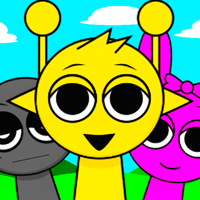
Sprunki is a browser-based music mixing game where you build looping tracks by dragging characters into empty performance slots. Each character adds a different beat, effect, melody, or vocal part, so you can swap sounds in and out until the mix works the way you want. Behind the colorful setup, Sprunki also hides a much darker transformation that changes both the characters and the music.
What Is Sprunki?
Sprunki is a fan-made music game inspired by the character-based mixing system of Incredibox. It was created by NyankoBfLol and uses a simple drag-and-drop interface rather than traditional rhythm-game timing.
You do not need to hit notes, follow arrows, or complete songs before a timer expires. Instead, Sprunki gives you a collection of sound-producing characters and lets you decide which ones should perform together.
Every active character contributes a repeating audio loop. Some provide percussion, some add background effects, others carry melodies, and others contribute vocal sounds. Because all of these loops play together, changing only one character can noticeably change the whole track.
There is also a hidden horror element. One special character can transform Sprunki from its bright normal appearance into a much darker version with altered visuals and sounds.
Game Overview
| Feature | Details |
|---|---|
| Game | Sprunki |
| Genre | Music / Rhythm / Creative Mixing |
| Creator | NyankoBfLol |
| Inspiration | Incredibox |
| Main Goal | Create music by combining character sound loops |
| Sound Types | Beats, effects, melodies, and vocals |
| Characters | 20 selectable characters in the standard version |
| Controls | Mouse-based drag and drop |
| Game Structure | Open-ended music creation |
| Horror Content | Yes |
| Online Play | Available in supported web browsers |
| Devices | Browser versions are available on desktop, phone, and tablet |
| Multiplayer | Not clearly listed |
How to Play Sprunki
Sprunki is easy to control because nearly everything happens through character placement. The real challenge is learning what each sound contributes and finding combinations that produce the type of track you want.
Choose Your First Character
At the bottom of the Sprunki screen, you can see icons representing the available characters. Each icon corresponds to a particular sound.
Drag one of these icons onto an empty character position. As soon as the character becomes active, its sound begins looping with the track.
You can start with almost anything, but beginning with a beat is useful because it gives the rest of your mix a clear rhythmic foundation.
Add More Sound Layers
Once your first loop is playing, add more Sprunki characters.
Try combining different sound categories instead of immediately filling every position with similar sounds. A basic mix might contain:
- A steady beat
- A background effect
- A recognizable melody
- A vocal layer
You can then add more characters to make the track denser.
There is no single correct Sprunki combination. The point is to listen to how the loops interact and adjust the lineup until you find something you like.
Replace Sounds That Do Not Fit
A character does not have to stay in your Sprunki mix permanently.
If a particular sound makes the track feel too crowded, repetitive, or dissonant, remove it and test another character. This trial-and-error process is a major part of the game.
You may find that a combination sounds weak with six active characters but works much better with only three or four. More sounds do not automatically create a better mix.
Use Mute, Focus, and Remove
Sprunki includes useful tools for listening to individual parts of your track.
When available in the browser version you are playing, hovering over an active character reveals controls that can help you manage the mix.
Mute temporarily stops that character's sound without removing the character.
Focus lets you isolate one performer so you can hear its loop more clearly.
Remove takes the character out of the active lineup, giving you room to try another sound.
These controls are especially useful once your Sprunki track becomes crowded and you are no longer sure which character is producing a particular sound.
Sprunki Sound Types
The standard Sprunki lineup is organized around four main types of audio.
Beats
Beat characters provide the rhythmic base of the track. Their loops are usually the easiest place to start because they establish a pulse for the melodies and vocals.
Characters associated with beats include Oren, Raddy, Clukr, Fun Bot, and Vineria.
Try using one beat first before adding a second. Two percussion-heavy characters can work well together, but adding too many immediately can make it harder to hear the other parts of your Sprunki mix.
Effects
Effects fill out the background with additional tones, textures, and repeating sounds.
These parts may feel less obvious when played alone, but they can make a large difference once several Sprunki characters are active.
Gray, Brud, Garnold, OWAKCX, and Sky are associated with this sound group.
Melodies
Melody characters provide some of the most noticeable musical phrases in Sprunki.
Mr. Sun, Durple, Mr. Tree, Simon, and Tunner contribute melodic parts. If your track has a strong beat but feels like it is missing a recognizable tune, try switching between these characters.
Because melodies occupy more attention than subtle effects, combining too many strong melodic loops at once can make the track feel busy.
Vocals
Vocals add voice-like or choir-style sounds on top of the instrumental layers.
Mr. Fun Computer, Wenda, Pinki, and Jevin are used for vocal parts in the standard lineup.
Vocals are often easiest to judge after you already have a beat and melody playing. Add one, listen for a few loops, and remove it if it competes too strongly with the rest of the track.
Sprunki Horror Mode
One of the most recognizable parts of Sprunki is the sudden change from colorful music mixing to horror.
The special Black Hat character is the key to this transformation. When you place Black into the active lineup, the presentation changes dramatically.
Characters receive darker or disturbing appearances, and the soundtrack shifts away from the lighter normal sounds. The same basic mixing idea remains, but the mood becomes much more unsettling.
This is not simply a cosmetic background change. Horror Mode gives you another set of sounds to experiment with, so combinations you already tested in normal Sprunki can feel very different after the transformation.
Because the game contains horror imagery and disturbing character designs, Sprunki may not be suitable for younger players despite the bright appearance of its normal mode.
Controls
Sprunki mainly uses the mouse on desktop.
| Action | Control |
|---|---|
| Select a character sound | Left Mouse Button |
| Add a character | Drag the icon onto an empty slot |
| Remove a character | Use the character's Remove / X option |
| Mute a character | Select the Mute control |
| Listen to one character | Use Focus |
| Reset the current lineup | Use the Restart button |
| Open character artwork | Use the Gallery option |
You do not need WASD, arrow keys, Space, or complicated keyboard combinations to play Sprunki. Most interaction comes from selecting, dragging, removing, and rearranging sound characters.
On browser versions that support phones and tablets, the same interface is handled through touchscreen interaction rather than a physical mouse.
Tips for Making Better Sprunki Mixes
Start With Two or Three Characters
Do not fill every available position immediately.
Start Sprunki with a beat and one complementary sound. Listen for several loops, then add a third character. Building gradually makes it much easier to understand what each sound contributes.
Build From Rhythm to Detail
A reliable order is beat → effect or melody → vocal.
This is not a required Sprunki rule, but it gives you a clear foundation. Once the main rhythm works, experiment with additional layers.
Remove Sounds Instead of Constantly Adding More
If your mix feels messy, adding another character usually makes the problem worse.
Mute or remove one Sprunki character at a time. The track may become noticeably cleaner as soon as you eliminate two sounds that are competing for the same space.
Use Focus to Learn the Characters
If you are new to Sprunki, use the Focus function to hear individual loops.
Learning which character produces which sound makes future mixes much faster. Instead of repeatedly testing random icons, you can choose a particular beat, melody, or vocal part from memory.
Revisit Combinations in Horror Mode
A lineup that sounds one way during normal Sprunki can create a very different atmosphere after the horror transformation.
If you find a normal combination you like, remember the characters before activating Black. Rebuilding the same lineup afterward is an easy way to compare both sound sets.
Give Each Mix Time to Loop
Do not judge a character after hearing only the first second of its sound.
Many Sprunki parts make more sense after the entire pattern repeats. Let a combination run for a few loops before deciding whether to keep or replace a character.
Is There a Goal in Sprunki?
Sprunki does not use a traditional score, race, level timer, or final boss. The standard experience is open-ended.
Your practical goal is to build combinations, listen to how the characters interact, discover sounds you enjoy, and experiment with the game's darker transformation.
That makes Sprunki closer to an interactive musical toy than a conventional rhythm challenge. You cannot really fail because you chose the "wrong" combination. If a mix does not sound right, simply remove a character and try something else.
This also gives Sprunki strong replay value. You can return and deliberately build a minimal three-character track, test a full layered arrangement, isolate individual loops, or compare normal sounds with their horror versions.
Can You Play Sprunki Online?
Yes. Sprunki is currently available through browser gaming platforms and can be played without using traditional keyboard movement controls.
Browser versions are available for desktop as well as supported mobile and tablet devices. The exact presentation may vary between hosting platforms, but the core Sprunki interaction remains based on combining character sound loops.
It is important to distinguish the original Sprunki concept from the large number of fan-made sequels, phases, remixes, and character expansions that now use the same name. Features found in those projects may not exist in the standard game.
Why Players Keep Experimenting With Sprunki
Sprunki works because every change produces immediate feedback.
You drag in a character and hear a new layer instantly. Remove it, and the track changes again. Replace a melody with a vocal or swap one beat for another, and the same group can suddenly feel completely different.
The horror transformation also gives the simple mixing system a second identity. Instead of just creating another cheerful loop, you can intentionally switch the game into its darker state and rebuild familiar combinations with altered sounds.
There is no need to memorize note charts or practice difficult timing patterns. Sprunki rewards listening, experimentation, and curiosity more than reaction speed.
FAQ
What is Sprunki?
Sprunki is a fan-made music mixing game where you combine character-based beats, effects, melodies, and vocals to create looping tracks.
Who created Sprunki?
Sprunki was created by NyankoBfLol as a fan-made project inspired by Incredibox.
How do you play Sprunki?
Drag character icons onto empty slots, listen to their sounds together, and remove or replace characters to change your mix.
How do you activate Horror Mode in Sprunki?
Place the Black Hat character into the active lineup to trigger the darker version of the game.
Can you play Sprunki online for free?
Yes. Browser versions of Sprunki are available to play online without installing a traditional desktop game.
Does Sprunki have levels or a final ending?
The standard Sprunki experience is primarily open-ended music creation rather than a level-based game with a fixed final objective.