





Play Wave Dash, a rhythm-based precision game where you guide an arrow through tight corridors, avoid traps, master timing, and create custom levels.
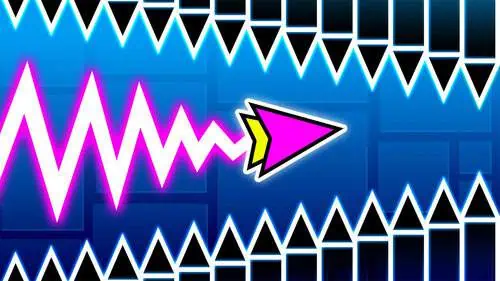
Here's a quick look at the game:
What Is Wave Dash?
Wave Dash is a rhythm-based precision platform game where you control an arrow moving automatically through narrow geometric corridors. Instead of running or jumping normally, the arrow follows a sharp zigzag movement pattern: hold the control to travel upward and release it to move downward.
Your objective is to reach the end of each stage without touching walls, spikes, barriers, or other hazards. A single collision can end the attempt, so progress depends on accurate timing and learning how each obstacle pattern fits together.
The controls are intentionally simple, but later sections leave very little room for error. Wave Dash also includes quick restarts, unlockable icons, ranking and speed-run elements, and a level editor for building your own obstacle courses.
How to Play Wave Dash
Your arrow constantly moves forward, so you do not control its horizontal speed directly. Instead, you determine whether it travels diagonally upward or downward.
Hold the movement button to make the arrow rise. Release it to make the arrow descend. Alternate between the two at the right moments to trace a zigzag route through openings in the level.
Avoid touching the upper and lower walls as well as spikes and other objects placed inside the corridor. Even a small timing error can send the arrow into an obstacle and force you to restart the stage.
A progress bar shows how far you have traveled through the current level. If you repeatedly crash at the same percentage, you can use that information to recognize the difficult section and adjust your timing on the next attempt.
Controls
| Action | Control |
|---|---|
| Rise | Hold Left Mouse Button or Spacebar |
| Descend | Release Left Mouse Button or Spacebar |
| Mobile movement | Touch and hold to rise, release to descend |
You only need one main input during normal gameplay. The challenge comes from controlling exactly how long you hold it.
Master the Wave Movement
Wave Dash does not use ordinary jumping physics. Every press immediately changes the direction of your movement, producing the distinctive wave-shaped path.
Long holds send the arrow farther upward, while short presses create smaller adjustments. The same applies when descending: releasing for too long can send you into the floor, while pressing again too quickly may push you into the ceiling.
Tight spaces often require a series of short, controlled inputs rather than long movements. Look at the shape of the corridor ahead and try to match your zigzag angle to the available space.
The arrow never stops moving forward while you make these corrections. That means you need to think about the next opening before you actually reach it.
Rhythm and Obstacle Patterns
Music is an important part of Wave Dash. Levels are designed around rhythmic movement, and the soundtrack can help you anticipate changes in the obstacle pattern.
You do not have to press on every beat, but recognizing the rhythm can make repeated sections easier to learn. After several attempts, difficult sequences often become less about reacting to individual spikes and more about remembering a pattern of holds and releases.
Some corridors give you plenty of room to adjust your height. Others narrow suddenly and demand much more precise movement. When the path becomes tight, avoid unnecessary corrections and concentrate on keeping your arrow near the safest line through the opening.
Quick Restarts and Learning a Level
Crashing is a normal part of progression in Wave Dash. Restarts happen quickly, letting you return to the stage and immediately attempt the difficult section again.
Instead of changing your timing randomly after every failure, pay attention to why you crashed. If you hit the ceiling, you probably held the input too long. If you dropped into a lower spike, you may have released too early or waited too long before rising again.
The progress indicator is useful here. Reaching a new percentage means your revised movement worked, even if you did not complete the entire level.
Unlockable Icons and Progression
Wave Dash includes different icons that you can unlock as you continue playing. These give you additional visual options for the object you guide through the stages without changing the basic hold-and-release control system.
There are also ranking and time-focused elements for players who want more than simply reaching the end. Once you can finish a route consistently, you can start concentrating on cleaner movement and improving your performance on repeated attempts.
This makes the same level useful in two ways: first as an obstacle course to learn and later as a route to master more precisely.
Create Levels With the Level Editor
One of the larger features in Wave Dash is its built-in level editor. Instead of only playing the included stages, you can design your own routes using walls, obstacles, spikes, and other level elements.
Building a playable stage requires the same understanding of movement that you use during normal levels. A gap needs enough space for the arrow's diagonal path, while consecutive obstacles need suitable timing if you want another player to pass them cleanly.
You can test your creation as you build it and make changes when a section feels too easy, too difficult, or impossible. Custom stages can also be shared, giving you additional routes beyond the main set of levels.
The editor is especially useful after you understand how short and long inputs affect the arrow. Designing your own corridor makes it easier to see how obstacle spacing changes the timing required from the player.
Tips for Difficult Sections
- Look ahead instead of watching only your arrow. The next opening tells you when your current movement needs to change.
- Use short inputs in narrow corridors. Small adjustments are easier to control than large swings between the ceiling and floor.
- Learn sections as patterns. Repeated attempts can turn a difficult sequence into a predictable rhythm.
- Do not overcorrect after a close call. One large movement can cause a second mistake immediately afterward.
- Watch your progress percentage. It helps identify exactly where your run is breaking down.
- Use the music as a timing reference. The rhythm can help you keep consistent inputs through repeated obstacle sequences.
- Restart with a specific correction in mind. Change the input that caused the previous collision instead of altering the entire run.
Improve Your Timing in Wave Dash
Wave Dash is easy to control because almost everything revolves around holding and releasing one button, but completing its tighter stages requires precise timing. The arrow moves continuously, every change in direction matters, and touching a single obstacle can reset your attempt.
Start by learning how long different presses move the arrow upward or downward. Once that movement feels predictable, focus on reading several obstacles ahead rather than reacting at the last second. With enough practice, the zigzag motion becomes more controlled, allowing you to clear difficult corridors, improve your runs, and experiment with creating challenges of your own in the level editor.